🔑 Key features of Snapvids Threads Downloader
- Threads Downloader to download any video, image/photo, or GIF from Threads.
- Download voice Threads with high quality.
- Download Threads audio with 320kps quality.
- Download Threads videos with High quality, including HD and 4K options.
- Convert Threads videos to audio MP3 format easily and quickly.
- Use your browser to download Threads videos. No extra extensions required.
- Compatible with all devices: PC/Mac, Android phones, and iPhones.
- High-speed, unlimited downloads for an efficient experience.
📖 How to use Snapvids to download Threads video and voice?
To download your favourite videos from Threads just follow these three simple steps.
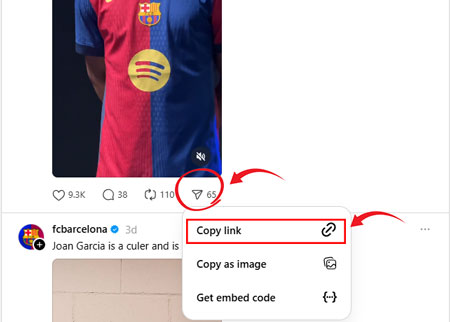
Step 1: Copy the Link to the post on Threads: Tap on the Share icon below the Thread post. Tap on Copy Link from the list of options.
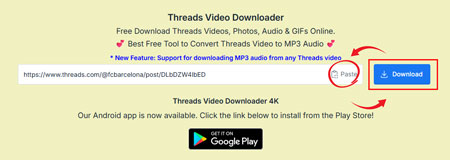
Step 2: Paste the Thread post link: Paste the copied link into the field above and click on the Download button.
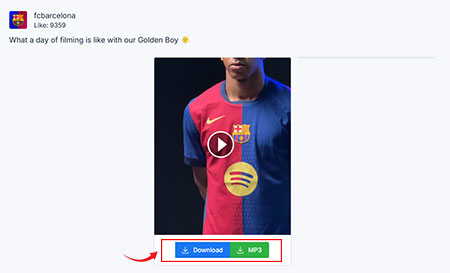
Step 3: Download your video: Click on the Download button to download the video easily.
❓Frequently Asked Questions - FAQs
- Open Threads app on your phone or web on your browser.
- Choose whatever video or image you want to download.
- Click to the Share button at the bottom of post.
- Click the Link button at the bottom.
- Go back to Snapvids and paste your post link to the field above then click to the Download button.
- Once you click the Download button, in just a few seconds, a page will load with links to save the video.
- 1. Copy the link of the Threads video you want to convert.
- 2. Paste the URL into the Threads Video Downloader tool.
- 3. Choose the "Download MP3" option and click download.
* Snapvids operates independently and maintains no connection to the Threads platform or Meta Platforms Inc. Our service is specifically created to assist users in retrieving media content from their personal accounts. We maintain the authority to suspend or deny access to our platform for users who employ our services in ways that infringe upon others' privacy rights or personal data protection.
Please refer to our Terms of Service for more information.