🔑 Snapvids Threads下载器的主要功能
- Threads下载器,用于下载Threads的任何视频、图片/照片或GIF。
- 以高质量下载Threads语音。
- 以320kps质量下载Threads音频。
- 以高质量下载Threads视频,包括HD和4K选项。
- 轻松快速地将Threads视频转换为MP3音频格式。
- 使用您的浏览器下载Threads视频。 无需额外扩展。
- 兼容所有设备:PC/Mac、Android手机和iPhone。
- 高速、无限量下载,提供高效体验。
📖 如何使用Snapvids下载Threads视频和语音?
要从Threads下载您喜爱的视频,只需遵循以下三个简单步骤。
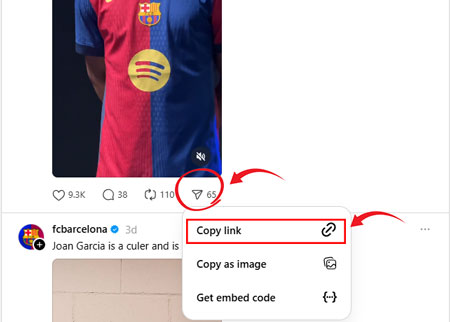
步骤1: 复制Threads帖子链接: 点击Threads帖子下方的分享图标。 从选项列表中点击复制链接。
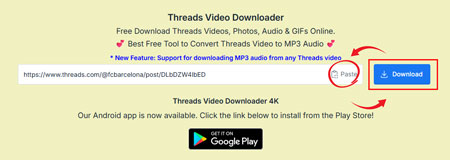
步骤2: 粘贴Threads帖子链接: 将复制的链接粘贴到上面的字段中,然后点击下载按钮。
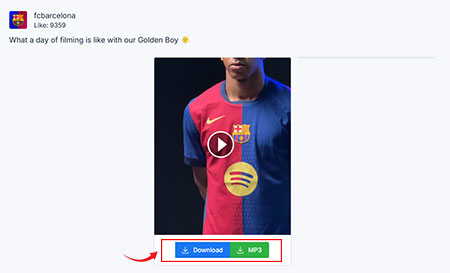
步骤3: 下载您的视频: 点击下载按钮轻松下载视频。
❓常见问题解答 - FAQs
Snapvids允许您通过一次点击直接将Threads的任何视频、照片和语音下载到您的设备。 Snapvids Threads下载器是一个免费的Threads视频下载器,下载速度极快。
是的,Snapvids是免费服务。 没有使用限制。
- 在您的手机上打开Threads应用程序或在浏览器上打开网页。
- 选择您想下载的任何视频或图片。
- 点击帖子底部的分享按钮。
- 点击底部的链接按钮。
- 返回Snapvids,将您的帖子链接粘贴到上面的字段中,然后点击下载按钮。
- 点击下载按钮后,几秒钟内将加载一个包含保存视频链接的页面。
No, you don't need to register or sign up to use Snapvids. 您只需要您想下载的Threads视频链接。
是的,Snapvids Threads下载器与GIF兼容。 这意味着您可以从Threads下载任何GIF。 只需输入您的帖子链接,然后点击“下载”按钮。
是的,Snapvids Threads下载器与Threads语音兼容。 只需输入您的帖子链接,然后点击“下载”按钮以320kps质量下载。
No, you can't. 由于隐私问题,Snapvids Threads视频下载应用程序只能从Threads公共账户下载视频、照片和语音。
请按照上述步骤复制Threads视频链接并使用本网站下载。
将Threads视频转换为MP3简单且免费:
- 1. 复制您想转换的Threads视频链接。
- 2. 将URL粘贴到Threads视频下载工具中。
- 3. 选择“下载MP3”选项并点击下载。
是的,您可以使用我们的工具轻松从Threads视频下载高质量语音MP3。音频提供多种质量,包括320kbps,确保您喜爱的视频音质清晰。
Absolutely! Our Threads MP3 Converter is 100% free and works on all devices, such as Windows PCs, Macs, Android smartphones, and iPhones. You don't need to install any apps or extensions-just use your browser for fast, unlimited downloads.
要从Threads.net下载语音到MP3,只需将语音链接粘贴到Snapvids下载工具中。选择MP3作为您的首选格式并点击“下载”。语音将转换为MP3并保存到您的设备,方便离线享受。
是的,您可以使用Snapvids免费从Threads.net下载并转换语音到MP3。该平台允许您轻松粘贴语音URL并以MP3格式下载,无任何隐藏费用,确保简单且经济高效的体验。
使用Snapvids从Threads.net下载语音到MP3仅在您拥有内容或获得创作者许可的情况下合法。确保遵守版权法,仅将Snapvids用于个人、非商业用途以避免任何法律问题。
* Snapvids operates independently and maintains no connection to the Threads platform or Meta Platforms Inc. Our service is specifically created to assist users in retrieving media content from their personal accounts. We maintain the authority to suspend or deny access to our platform for users who employ our services in ways that infringe upon others' privacy rights or personal data protection.
请参阅我们的 服务条款 以获取更多信息。