🔑 Kluczowe funkcje downloadera Threads Snapvids
- Downloader Threads do pobierania dowolnego wideo, obrazu/zdjęcia lub GIF-a z Threads.
- Pobieraj głos Threads w wysokiej jakości.
- Pobieraj audio Threads w jakości 320kbps.
- Pobieraj wideo Threads w wysokiej jakości, w tym w opcjach HD i 4K.
- Konwertuj wideo Threads na format audio MP3 łatwo i szybko.
- Użyj przeglądarki, aby pobrać wideo Threads. Nie wymaga dodatkowych rozszerzeń.
- Kompatybilne z wszystkimi urządzeniami: PC/Mac, telefony z Androidem i iPhone’y.
- Szybkie, nieograniczone pobieranie dla efektywnego doświadczenia.
📖 Jak używać Snapvids do pobierania wideo i głosu Threads?
Aby pobrać ulubione wideo z Threads, wystarczy postępować zgodnie z tymi trzema prostymi krokami.
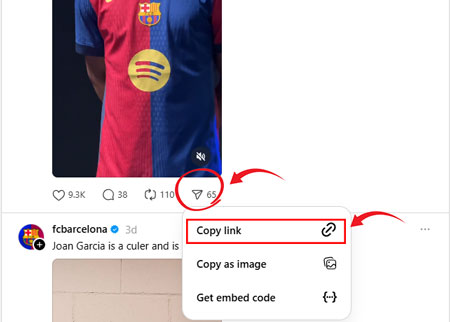
Krok 1: Skopiuj link do posta na Threads: Stuknij ikonę udostępniania poniżej posta Threads. Stuknij Kopiuj link z listy opcji.
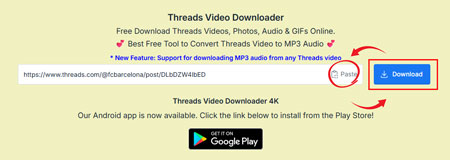
Krok 2: Wklej link do posta Threads: Wklej skopiowany link do pola powyżej i kliknij przycisk Pobierz.
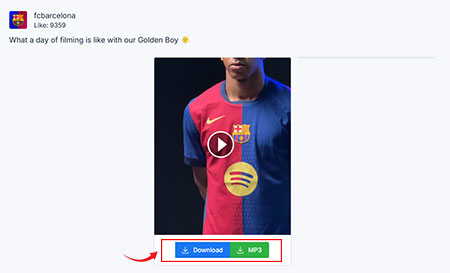
Krok 3: Pobierz swoje wideo: Kliknij przycisk Pobierz, aby łatwo pobrać wideo.
❓Często zadawane pytania - FAQ
- Otwórz aplikację Threads na telefonie lub stronę internetową w przeglądarce.
- Wybierz dowolne wideo lub zdjęcie, które chcesz pobrać.
- Kliknij przycisk Udostępnij na dole posta.
- Kliknij przycisk Link na dole.
- Wróć do Snapvids, wklej link do posta w polu powyżej, a następnie kliknij przycisk Pobierz.
- Po kliknięciu przycisku Pobierz, w ciągu kilku sekund załaduje się strona z linkami do zapisania wideo.
- 1. Skopiuj link do wideo Threads, które chcesz przekonwertować.
- 2. Wklej URL do narzędzia downloadera wideo Threads.
- 3. Wybierz opcję „Pobierz MP3” i kliknij pobierz.
* Snapvids operates independently and maintains no connection to the Threads platform or Meta Platforms Inc. Our service is specifically created to assist users in retrieving media content from their personal accounts. We maintain the authority to suspend or deny access to our platform for users who employ our services in ways that infringe upon others' privacy rights or personal data protection.
Proszę odnieść się do naszego Warunki korzystania z usługi po więcej informacji.