🔑 Snapvids Threads 다운로더의 주요 기능
- Threads에서 비디오, 이미지/사진, GIF를 다운로드하는 Threads 다운로더.
- 고품질로 Threads 음성 다운로드.
- 320kbps 품질로 Threads 오디오 다운로드.
- HD 및 4K 옵션을 포함한 고품질로 Threads 비디오 다운로드.
- Threads 비디오를 쉽게 빠르게 MP3 오디오 형식으로 변환.
- 브라우저를 사용하여 Threads 비디오 다운로드. 추가 확장 프로그램 불필요.
- 모든 기기와 호환: PC/Mac, Android 휴대폰, iPhone.
- 효율적인 경험을 위한 고속, 무제한 다운로드.
📖 Snapvids를 사용하여 Threads 비디오와 음성을 다운로드하는 방법은?
Threads에서 좋아하는 비디오를 다운로드하려면 다음 세 가지 간단한 단계를 따르세요.
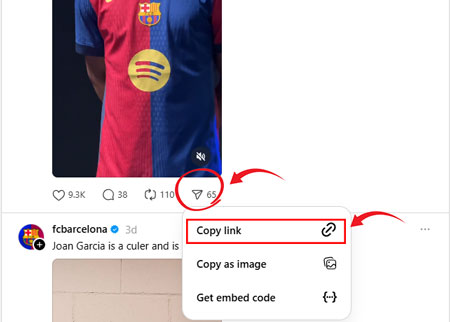
1단계: Threads 게시물의 링크 복사: Threads 게시물 아래의 공유 아이콘을 탭하세요. 옵션 목록에서 링크 복사를 탭하세요.
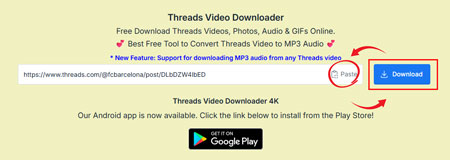
2단계: Threads 게시물 링크 붙여넣기: 복사한 링크를 위 필드에 붙여넣고 다운로드 버튼을 클릭하세요.
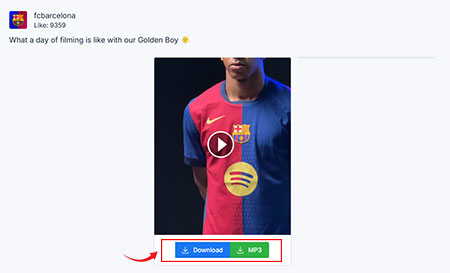
3단계: 비디오 다운로드: 다운로드 버튼을 클릭하여 비디오를 쉽게 다운로드하세요.
❓자주 묻는 질문 - FAQ
Snapvids는 한 번의 클릭으로 Threads에서 비디오, 사진, 음성을 직접 기기에 다운로드할 수 있게 합니다. Snapvids Threads 다운로더는 초고속 다운로드 속도를 제공하는 무료 Threads 비디오 다운로더입니다.
예, Snapvids는 무료 서비스입니다. 사용 제한이 없습니다.
- 휴대폰에서 Threads 앱을 열거나 브라우저에서 웹을 여세요.
- 다운로드하려는 비디오 또는 이미지를 선택하세요.
- 게시물 하단의 공유 버튼을 클릭하세요.
- 하단의 링크 버튼을 클릭하세요.
- Snapvids로 돌아가서 게시물 링크를 위 필드에 붙여넣고 다운로드 버튼을 클릭하세요.
- 다운로드 버튼을 클릭하면 몇 초 안에 비디오를 저장할 링크가 포함된 페이지가 로드됩니다.
No, you don't need to register or sign up to use Snapvids. 다운로드하려는 Threads 비디오의 링크만 있으면 됩니다.
예, Snapvids Threads 다운로더는 GIF와 호환됩니다. 즉, Threads에서 모든 GIF를 다운로드할 수 있습니다. 게시물 링크를 입력한 후 "다운로드" 버튼을 클릭하세요.
예, Snapvids Threads 다운로더는 Threads 음성과 호환됩니다. 게시물 링크를 입력한 후 "다운로드" 버튼을 클릭하여 320kbps 품질로 다운로드하세요.
No, you can't. Snapvids Threads 비디오 다운로더 앱은 개인 정보 문제로 인해 Threads 공개 계정에서만 비디오, 사진, 음성을 다운로드할 수 있습니다.
위에 언급된 단계를 따라 Threads 비디오의 링크를 복사하고 이 사이트를 사용하여 다운로드하세요.
Threads 비디오를 MP3로 변환하는 것은 간단하고 무료입니다:
- 1. 변환하려는 Threads 비디오의 링크를 복사하세요.
- 2. Threads 비디오 다운로더 도구에 URL을 붙여넣으세요.
- 3. "MP3 다운로드" 옵션을 선택하고 다운로드를 클릭하세요.
예, 우리 도구를 사용하여 Threads 비디오에서 고품질 음성 MP3를 쉽게 다운로드할 수 있습니다. 오디오는 320kbps를 포함한 다양한 품질로 제공되어 좋아하는 비디오에 선명한 사운드를 보장합니다.
Absolutely! Our Threads MP3 Converter is 100% free and works on all devices, such as Windows PCs, Macs, Android smartphones, and iPhones. You don't need to install any apps or extensions-just use your browser for fast, unlimited downloads.
Threads.net에서 음성을 MP3로 다운로드하려면 Snapvids 다운로더 도구에 음성 링크를 붙여넣으세요. 선호하는 형식으로 MP3를 선택하고 "다운로드"를 클릭하세요. 음성은 MP3로 변환되어 기기에 저장되며, 오프라인에서도 쉽게 즐길 수 있습니다.
예, Snapvids를 사용하여 Threads.net에서 음성을 무료로 다운로드하고 MP3로 변환할 수 있습니다. 이 플랫폼은 음성의 URL을 쉽게 붙여넣고 숨겨진 비용 없이 MP3 형식으로 다운로드할 수 있도록 하여 간단하고 비용 효율적인 경험을 보장합니다.
Snapvids를 사용하여 Threads.net에서 음성을 MP3로 다운로드하는 것은 콘텐츠가 귀하의 소유이거나 제작자의 허가를 받은 경우에만 합법입니다. 저작권법을 준수하고 Snapvids를 개인적, 비상업적 용도로 사용하여 법적 문제를 피하세요.
* Snapvids operates independently and maintains no connection to the Threads platform or Meta Platforms Inc. Our service is specifically created to assist users in retrieving media content from their personal accounts. We maintain the authority to suspend or deny access to our platform for users who employ our services in ways that infringe upon others' privacy rights or personal data protection.
자세한 내용은 다음을 참조하세요 서비스 약관 추가 정보.