🔑 Snapvids Threadsダウンローダーの主な機能
- Threadsからビデオ、画像/写真、GIFをダウンロードするThreadsダウンローダー。
- 高品質でThreads音声をダウンロード。
- 320kbps品質でThreadsオーディオをダウンロード。
- HDおよび4Kオプションを含む高品質でThreadsビデオをダウンロード。
- Threadsビデオを簡単に素早くMP3オーディオ形式に変換。
- ブラウザを使用してThreadsビデオをダウンロード。 追加の拡張機能は不要。
- すべてのデバイスに対応:PC/Mac、Android携帯電話、iPhone。
- 効率的な体験のための高速、無制限のダウンロード。
📖 Snapvidsを使用してThreadsビデオと音声をダウンロードする方法は?
Threadsからお気に入りのビデオをダウンロードするには、以下の3つの簡単な手順に従ってください。
ステップ1: Threadsの投稿へのリンクをコピーする: Threads投稿の下にある共有アイコンをタップします。 オプションのリストから「リンクをコピー」をタップします。
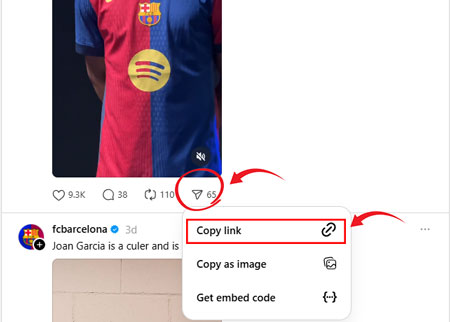
ステップ2: Threads投稿のリンクを貼り付ける: コピーしたリンクを上記のフィールドに貼り付け、ダウンロードボタンをクリックします。
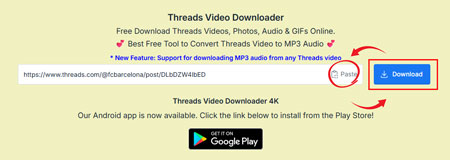
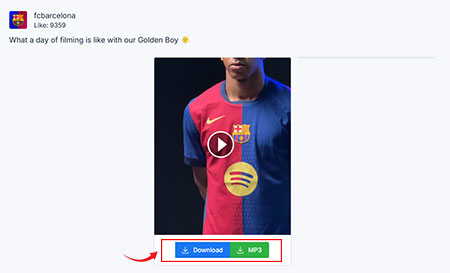
ステップ3: ビデオをダウンロード: ダウンロードボタンをクリックしてビデオを簡単にダウンロードします。
❓よくある質問 - FAQ
Snapvidsは、ワンクリックでThreadsからビデオ、写真、音声を直接デバイスにダウンロードできます。 Snapvids Threadsダウンローダーは、超高速ダウンロード速度の無料Threadsビデオダウンローダーです。
はい、Snapvidsは無料サービスです。 使用制限はありません。
- 電話でThreadsアプリを開くか、ブラウザでウェブを開きます。
- ダウンロードしたいビデオまたは画像を選択します。
- 投稿の下部にある共有ボタンをクリックします。
- 下部にあるリンクボタンをクリックします。
- Snapvidsに戻り、投稿リンクを上記のフィールドに貼り付け、ダウンロードボタンをクリックします。
- ダウンロードボタンをクリックすると、数秒でビデオを保存するためのリンクが記載されたページが読み込まれます。
No, you don't need to register or sign up to use Snapvids. ダウンロードしたいThreadsビデオのリンクだけが必要です。
はい、Snapvids ThreadsダウンローダーはGIFに対応しています。 つまり、Threadsから任意のGIFをダウンロードできます。 投稿リンクを入力して「ダウンロード」ボタンをクリックするだけです。
はい、Snapvids ThreadsダウンローダーはThreadsの音声に対応しています。 投稿リンクを入力して「ダウンロード」ボタンをクリックすると、320kbpsの品質でダウンロードできます。
No, you can't. Snapvids Threadsビデオダウンローダーアプリは、プライバシーの問題により、Threadsの公開アカウントからのビデオ、写真、音声のみをダウンロードできます。
上記の手順に従って、Threadsビデオのリンクをコピーし、このサイトを使用してダウンロードしてください。
ThreadsのビデオをMP3に変換するのは簡単で無料です:
- 1. 変換したいThreadsビデオのリンクをコピーします。
- 2. ThreadsビデオダウンローダーツールにURLを貼り付けます。
- 3. 「MP3をダウンロード」オプションを選択し、ダウンロードをクリックします。
はい、当社のツールを使用して、Threadsのビデオから高品質の音声MP3を簡単にダウンロードできます。オーディオは320kbpsを含むさまざまな品質で利用でき、お気に入りのビデオにクリアなサウンドを保証します。
Absolutely! Our Threads MP3 Converter is 100% free and works on all devices, such as Windows PCs, Macs, Android smartphones, and iPhones. You don't need to install any apps or extensions-just use your browser for fast, unlimited downloads.
Threads.netから音声をMP3にダウンロードするには、音声のリンクをSnapvidsダウンローダーツールに貼り付け、MP3を希望の形式として選択し、「ダウンロード」をクリックします。音声はMP3に変換され、デバイスに保存され、オフラインで簡単に楽しめます。
はい、Snapvidsを使用してThreads.netから音声を無料でダウンロードおよびMP3に変換できます。このプラットフォームでは、音声のURLを簡単に貼り付け、隠れた料金なしでMP3形式でダウンロードでき、シンプルでコスト効率の良い体験を保証します。
Snapvidsを使用してThreads.netから音声をMP3にダウンロードすることは、コンテンツがあなたのものであるか、作成者からの許可がある場合にのみ合法です。著作権法を尊重し、個人的な非商業的使用のためにSnapvidsを使用してください。
* Snapvids operates independently and maintains no connection to the Threads platform or Meta Platforms Inc. Our service is specifically created to assist users in retrieving media content from their personal accounts. We maintain the authority to suspend or deny access to our platform for users who employ our services in ways that infringe upon others' privacy rights or personal data protection.
詳細については、以下を参照してください 利用規約 詳細情報。